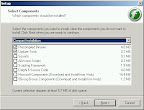
I dig up sourceforge.net, found floAt Mobile Agent. There is version 2.0 (stable). Installation has a hitch. Do not install with full installation as links for software downloads from microsoft is no longer correct, and installation will fail. Instead install minimum (or custom - excluding all those extras).
Then luckily I have the data cable for T290i (DCU-11), bought it last time to play with MMS (using sony software).
It takes me 2 nights to figure out (with google help) that to connect correctly, the setup is as follows: Menu=>Tools=>Options:
General tab, choose serial port, Port=whichever com port you are connected to, baud rate=default=9600, RTS=handshake, DTR=handshake. Click OK.
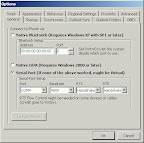
That will connect the phone with floAt's Mobile Agent 2.0
It will think that your phone is T230, but it got all my SMS, address book synch (Menu=>Sync=>Phone Contacts) has a problem. It hangs. Back to google.
It seems like people has been trying to synch with outlook, but outlook is not the only address book, there is this free apps called "Address Book" at Start=>Programs=>Accessories=>Address Book. If you dont have it, whip out your XP installation disk and add that.
Back to floAt's Mobile Agent 2.0, you have to change another setting: Menu=>Tools=>Options: OBEX tab.
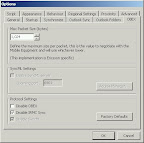
Max Packet Size = default = 1024 bytes, and disable IRMC Sync. It will prompt you that it is required for Outlook Sync but you are not going to sync with outlook so who cares!
But make sure you do not disable OBEX. You need obex. Click OK.
Try again: Menu=>Sync=>Phone Contacts, and it is happier, started downloading all my contacs from phone memory to PC, displaying them in floAt's Mobile Agent 2.0 apps. Now select all those contacts, right click, select Export as VCard.
It will ask to save as what name, fret not, call it T290, and it will pre-pend all the VCards files with T290. Click SAVE.
Wham... all are at 'My Document' folder. GREAT.
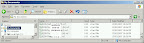
Close floAt's Mobile Agent 2.0 apps (or window if you insist), on tray bar icon, right click and 'Toggle Disconnect'. Then safely remove hardware -- stop your data cable, unplug that from USB. Then restart the PC to be safe.
Once started, you need to do some work. Open 'My Document' using Windows Explorer, see all those vcard? Sort by type if they got mixed up with other files.
Go to: Start=>Programs=>Accessories=>Address Book to run it.
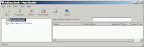
Select all those v-cards and dump them (drag-and-drop) to Address Book, and assuming you do not have duplicates, it will be seamless. If you have entered more than one number eg: office phone and mobile phone, of the same person, you will have 2 vcard. Just open the one that complains with duplication, select and copy the number. Double click the address book entry from Address Book app, and paste the copied number in appropriate box. Repeat as necessary.
There you have it.
Now I can use floAt to Synch the Windows Address Book, but I want to try Sony Ericcson PC suit.
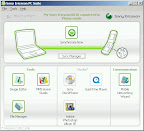
I hook up my K610i with the PC link cable (this one is supplied with the phone) and connect the USB to PC. It will prompt for you to make a selection and select "Phone" mode.
Click the 'sync manager' button.
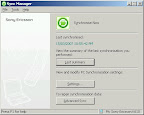
My K610i address book is empty, so it is safe for me to do Advance Sync, choosing Overwrite Device (if you have some entries, may be Merge is a better choice but NEVER choose Overwrite PC).
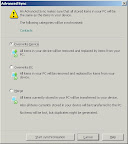
Click button 'Start Synchronisation', and wait until it is finished. Done!

3 comments:
I spend like 4 months trying to sync my K610i with a VAIO FE and untill I find your post, The explication is perfect I follow all your steps and get it :D Thank you very much. At last, can´t conect de phone with the PC suite, is beacuse know I don´t have UBS conector, trying to do it with bluetooth but still impisble, but float´s is perfect, tomorrow at the office pick the cable and try it again. I will tell you some tomorrow ;).
Bye!
I am glad that my effort is useful for others, which is why I posted this. I mean, it could be a solution for other models too, right? Just that I have never tried it with other phone because I do not have one. :)
The main lesson is... why use outlook address book. There are others... :)
Thanks heaps, putting my K750i's contacts memory into windows address book means I can sync them to my new iphone.
The only problem is I love my K750i and don't want to make it redundant..
Post a Comment