After a long delay (11 days) Sony Ericcson Customer Center comes back with a solution. YES! Finally,... but is is for a wrong phone model. I would like to extract out the addressbook entries from my old phone, model is T290i. My new phone is K610i. The given link in the mail is for T610 model.
I am wondering if these people are concentrating while they are working.
By the way, I have found a solution myself. Here is the link.
Dear Sir/Madam,
Thank you for contacting Sony Ericsson Call Center.
With regards to your inquiry,
Thank you for your patience towards the matter, as such we have to direct you to the following page to download the synchronization drivers
http://www.sonyericsson.com/spg.jsp?cc=sg&lc=en&ver=4000&template=ps1_1_3_1&zone=ps&lm=ps1&pid=10055
Kindly download the software under the synchronization segment
Thank you and very sorry for the very long wait
Best regards,
Andy zeng
Sony Ericsson Call Center
If we can be of further assistance, please email to us at questions.sg@support.sonyericsson.com
For the latest news and further product information,kindly visit our website at www.sonyericsson.com
For software downloads and user guides,kindly visit our website at www.sonyericsson.com/support
For content downloads, kindly visit our website at www.sonyericsson.com/fun.
Question:
Email:
To: questions.sg@support.sonyericsson.com
From: [my email address]
Subject: Re: Case : 70867368
Hi,
My problem is transferring address book!
Please read my original email attached below carefully
and make sure solution offered is suitable.
I did all the steps and here is what I meant by image
editors only:
==============================================
Software downloads
Software for your T290i is available in the following
categories: Imaging . Click a link below to see
details and installation instructions for the
software.
Imaging
Organise and edit your pictures. Make them ready to
use in picture messages, themes and more.
Adobe® Photoshop® Album Starter Edition 3.0
Sony Ericsson Image Editor 2.11.6b
Sony Ericsson MMS Home Studio 1.1.0.380c
==============================================
--- questions.sg@support.sonyericsson.com wrote:
---------------------------------
Dear Sir/Madam,
Thank you for contacting Sony Ericsson Call Center.
With regards to your inquiry,
Kindly do download the necessary software off our
website to transfer your contacts from your T290i.
Proceed to the sony ericsson page
www.sonyericsson.com
Select singapore
Select Support
Select your phone
Select Software downloads
Thank you for your inquiry
Best regards,
Andy zeng
Sony Ericsson Call Center
If we can be of further assistance, please email to us
at questions.sg@support.sonyericsson.com
For the latest news and further product
information,kindly visit our website at
www.sonyericsson.com
For software downloads and user guides,kindly visit
our website at www.sonyericsson.com/support
For content downloads, kindly visit our website at
www.sonyericsson.com/fun.
Question:
Email:
To: questions.sg@support.sonyericsson.com
From: [my email address]
Subject: Phones
Product: K610i
Opinion: Hi, I would like to transfer phonebook
entries from T290i to K610i, but the supplied software
from K610i cannot synch phonebook with T290i (there is
no synch software in CD for T290i - only photo
editors). Phonebook entries to transfer is from phone
to phone and not from sim card.
Country: Singapore
[Personal detail undisclosed]
City / Region: Singapore
Agree Legal Terms: Yes.
Sign up for enews: No.
26 March 2007

15 March 2007
Solution to transfer addressbook from Sony Ericcson T290i
Without useful customer service replies from Sony Ericcson Customer support, I have to end up supporting myself.
I dig up sourceforge.net, found floAt Mobile Agent. There is version 2.0 (stable). Installation has a hitch. Do not install with full installation as links for software downloads from microsoft is no longer correct, and installation will fail. Instead install minimum (or custom - excluding all those extras).
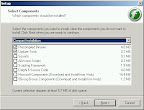
Then luckily I have the data cable for T290i (DCU-11), bought it last time to play with MMS (using sony software).
It takes me 2 nights to figure out (with google help) that to connect correctly, the setup is as follows: Menu=>Tools=>Options:
General tab, choose serial port, Port=whichever com port you are connected to, baud rate=default=9600, RTS=handshake, DTR=handshake. Click OK.
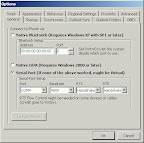
That will connect the phone with floAt's Mobile Agent 2.0
It will think that your phone is T230, but it got all my SMS, address book synch (Menu=>Sync=>Phone Contacts) has a problem. It hangs. Back to google.
It seems like people has been trying to synch with outlook, but outlook is not the only address book, there is this free apps called "Address Book" at Start=>Programs=>Accessories=>Address Book. If you dont have it, whip out your XP installation disk and add that.
Back to floAt's Mobile Agent 2.0, you have to change another setting: Menu=>Tools=>Options: OBEX tab.
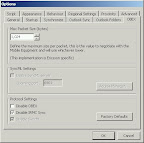
Max Packet Size = default = 1024 bytes, and disable IRMC Sync. It will prompt you that it is required for Outlook Sync but you are not going to sync with outlook so who cares!
But make sure you do not disable OBEX. You need obex. Click OK.
Try again: Menu=>Sync=>Phone Contacts, and it is happier, started downloading all my contacs from phone memory to PC, displaying them in floAt's Mobile Agent 2.0 apps. Now select all those contacts, right click, select Export as VCard.
It will ask to save as what name, fret not, call it T290, and it will pre-pend all the VCards files with T290. Click SAVE.
Wham... all are at 'My Document' folder. GREAT.
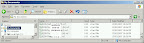
Close floAt's Mobile Agent 2.0 apps (or window if you insist), on tray bar icon, right click and 'Toggle Disconnect'. Then safely remove hardware -- stop your data cable, unplug that from USB. Then restart the PC to be safe.
Once started, you need to do some work. Open 'My Document' using Windows Explorer, see all those vcard? Sort by type if they got mixed up with other files.
Go to: Start=>Programs=>Accessories=>Address Book to run it.
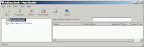
Select all those v-cards and dump them (drag-and-drop) to Address Book, and assuming you do not have duplicates, it will be seamless. If you have entered more than one number eg: office phone and mobile phone, of the same person, you will have 2 vcard. Just open the one that complains with duplication, select and copy the number. Double click the address book entry from Address Book app, and paste the copied number in appropriate box. Repeat as necessary.
There you have it.
Now I can use floAt to Synch the Windows Address Book, but I want to try Sony Ericcson PC suit.
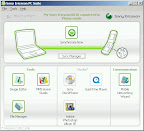
I hook up my K610i with the PC link cable (this one is supplied with the phone) and connect the USB to PC. It will prompt for you to make a selection and select "Phone" mode.
Click the 'sync manager' button.
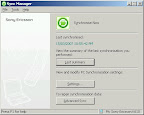
My K610i address book is empty, so it is safe for me to do Advance Sync, choosing Overwrite Device (if you have some entries, may be Merge is a better choice but NEVER choose Overwrite PC).
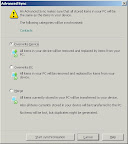
Click button 'Start Synchronisation', and wait until it is finished. Done!
I dig up sourceforge.net, found floAt Mobile Agent. There is version 2.0 (stable). Installation has a hitch. Do not install with full installation as links for software downloads from microsoft is no longer correct, and installation will fail. Instead install minimum (or custom - excluding all those extras).
Then luckily I have the data cable for T290i (DCU-11), bought it last time to play with MMS (using sony software).
It takes me 2 nights to figure out (with google help) that to connect correctly, the setup is as follows: Menu=>Tools=>Options:
General tab, choose serial port, Port=whichever com port you are connected to, baud rate=default=9600, RTS=handshake, DTR=handshake. Click OK.
That will connect the phone with floAt's Mobile Agent 2.0
It will think that your phone is T230, but it got all my SMS, address book synch (Menu=>Sync=>Phone Contacts) has a problem. It hangs. Back to google.
It seems like people has been trying to synch with outlook, but outlook is not the only address book, there is this free apps called "Address Book" at Start=>Programs=>Accessories=>Address Book. If you dont have it, whip out your XP installation disk and add that.
Back to floAt's Mobile Agent 2.0, you have to change another setting: Menu=>Tools=>Options: OBEX tab.
Max Packet Size = default = 1024 bytes, and disable IRMC Sync. It will prompt you that it is required for Outlook Sync but you are not going to sync with outlook so who cares!
But make sure you do not disable OBEX. You need obex. Click OK.
Try again: Menu=>Sync=>Phone Contacts, and it is happier, started downloading all my contacs from phone memory to PC, displaying them in floAt's Mobile Agent 2.0 apps. Now select all those contacts, right click, select Export as VCard.
It will ask to save as what name, fret not, call it T290, and it will pre-pend all the VCards files with T290. Click SAVE.
Wham... all are at 'My Document' folder. GREAT.
Close floAt's Mobile Agent 2.0 apps (or window if you insist), on tray bar icon, right click and 'Toggle Disconnect'. Then safely remove hardware -- stop your data cable, unplug that from USB. Then restart the PC to be safe.
Once started, you need to do some work. Open 'My Document' using Windows Explorer, see all those vcard? Sort by type if they got mixed up with other files.
Go to: Start=>Programs=>Accessories=>Address Book to run it.
Select all those v-cards and dump them (drag-and-drop) to Address Book, and assuming you do not have duplicates, it will be seamless. If you have entered more than one number eg: office phone and mobile phone, of the same person, you will have 2 vcard. Just open the one that complains with duplication, select and copy the number. Double click the address book entry from Address Book app, and paste the copied number in appropriate box. Repeat as necessary.
There you have it.
Now I can use floAt to Synch the Windows Address Book, but I want to try Sony Ericcson PC suit.
I hook up my K610i with the PC link cable (this one is supplied with the phone) and connect the USB to PC. It will prompt for you to make a selection and select "Phone" mode.
Click the 'sync manager' button.
My K610i address book is empty, so it is safe for me to do Advance Sync, choosing Overwrite Device (if you have some entries, may be Merge is a better choice but NEVER choose Overwrite PC).
Click button 'Start Synchronisation', and wait until it is finished. Done!
Sony Support? What support?
Update to this can be found here.
Enclosed is the email conversation I have with Sony Support:
Basically despite me telling them that there is no other software for sychronizing addressbook from my old SonyEriccson T290i mobilephone to my new K610i mobilephone, they slap me a standard reply -- go download software from our website!
grr....
Dear Sir/Madam,
Thank you for contacting Sony Ericsson Call Center.
With regards to your inquiry,
Kindly do download the necessary software off our website to transfer your contacts from your T290i.
Proceed to the sony ericsson page
www.sonyericsson.com
Select singapore
Select Support
Select your phone
Select Software downloads
Thank you for your inquiry
Best regards,
Andy zeng
Sony Ericsson Call Center
If we can be of further assistance, please email to us at questions.sg@support.sonyericsson.com
For the latest news and further product information,kindly visit our website at www.sonyericsson.com
For software downloads and user guides,kindly visit our website at www.sonyericsson.com/support
For content downloads, kindly visit our website at www.sonyericsson.com/fun.
Question:
Email:
To: questions.sg@support.sonyericsson.com
From: my-email-address
Subject: Phones
Product: K610i
Opinion: Hi, I would like to transfer phonebook entries from T290i to K610i, but the supplied software from K610i cannot synch phonebook with T290i (there is no synch software in CD for T290i - only photo editors). Phonebook entries to transfer is from phone to phone and not from sim card.
Country: Singapore
Personal details retained
Sony Ericcson Customer Service Center at Wisma Atria, Orchard does not fare better.
The girl there just told me that they could only help if it is both supporting blue tooth. DUH! I don't need a to go to service center, queue up for 1 hour just for that! OK fine, they offered to contact me after asking their engineer who are not on site (may be they are at Jurong East?).
Finally they called me after 2 hours, and basically told me that it cannot be done because T290i is an old phone and phonebook synch is not supported. I told her that I have the datacable, if they dont have it they can use mine, if that is stopping them, but she insisted that it is not possible.
Thank you, hangup.
BAH! I dont buy that argument. Phonebook entries are files! Files can be tranferred!
I have to prove it can be done, and it is proven. Here is the solution.
Enclosed is the email conversation I have with Sony Support:
Basically despite me telling them that there is no other software for sychronizing addressbook from my old SonyEriccson T290i mobilephone to my new K610i mobilephone, they slap me a standard reply -- go download software from our website!
grr....
Dear Sir/Madam,
Thank you for contacting Sony Ericsson Call Center.
With regards to your inquiry,
Kindly do download the necessary software off our website to transfer your contacts from your T290i.
Proceed to the sony ericsson page
www.sonyericsson.com
Select singapore
Select Support
Select your phone
Select Software downloads
Thank you for your inquiry
Best regards,
Andy zeng
Sony Ericsson Call Center
If we can be of further assistance, please email to us at questions.sg@support.sonyericsson.com
For the latest news and further product information,kindly visit our website at www.sonyericsson.com
For software downloads and user guides,kindly visit our website at www.sonyericsson.com/support
For content downloads, kindly visit our website at www.sonyericsson.com/fun.
Question:
Email:
To: questions.sg@support.sonyericsson.com
From: my-email-address
Subject: Phones
Product: K610i
Opinion: Hi, I would like to transfer phonebook entries from T290i to K610i, but the supplied software from K610i cannot synch phonebook with T290i (there is no synch software in CD for T290i - only photo editors). Phonebook entries to transfer is from phone to phone and not from sim card.
Country: Singapore
Personal details retained
Sony Ericcson Customer Service Center at Wisma Atria, Orchard does not fare better.
The girl there just told me that they could only help if it is both supporting blue tooth. DUH! I don't need a to go to service center, queue up for 1 hour just for that! OK fine, they offered to contact me after asking their engineer who are not on site (may be they are at Jurong East?).
Finally they called me after 2 hours, and basically told me that it cannot be done because T290i is an old phone and phonebook synch is not supported. I told her that I have the datacable, if they dont have it they can use mine, if that is stopping them, but she insisted that it is not possible.
Thank you, hangup.
BAH! I dont buy that argument. Phonebook entries are files! Files can be tranferred!
I have to prove it can be done, and it is proven. Here is the solution.
06 March 2007
Honda bicycle?!?

From singapore_daily
Obviously a scrap assembly, this motorized bicycle parked outside Serangoon MRT station fancily showed a Honda motorbike seat. It will be more comfortable to ride I believe.
05 March 2007
Kangaroo meat as dog food?!?
This morning, while travelling to office on a bus, I saw an advertisement on top of taxi. It read: Kangaroo & Apple. I cannot remember the brand, but it was a surprise for me. After googling about that I realized that it was quite common now, since kangaroo is also a source of meat in australia. When I was studying in Australia 10 years ago, they have just started promoting kangaroo and emu meat. I guess it is a natural progression from human food to pet food. It is funny looking back, it felt like cultural shock to me.
Subscribe to:
Comments (Atom)